EcommerceDDD++: Streamlining API Client Generation with Kiota and Koalesce
EcommerceDDD++ is a companion series to the original six-part series. Each post covers a meaningful improvement or addition to the EcommerceDDD project that didn’t fit neatly into the original arc.
This first entry highlights automated API client generation from OpenAPI specs to streamline HTTP requests.
I’ll walk through the rationale behind this shift, the choice of tools (Kiota and Koalesce), and how together they solve real-world integration challenges in a microservice architecture like the one used in EcommerceDDD.
Why Generate API Clients?
Like most fullstack projects out there, EcommerceDDD handled its communication for back and front ends with handcrafted HTTP calls using HttpClient, hardcoded path strings, request/response models, authorization, and every sort of detail. As obvious as it can seem, this can be very error-prone and redundant, often leading to model and path mismatches. Changes in the public contract (API) can break the application unnoticed, because the binding is very thin and there was no build-time check.
Holding both back and front ends, I decided to go with a more robust and reliable approach to eliminate the burden of pairing both stacks for every change, using the existing OpenAPI specs of the project’s APIs to feed a tool that could generate strongly typed, SDK-style clients consumable from both front and back ends.
That’s very straightforward in a monolithic architecture, since it results in a single specification, but in a microservice-based one, it can be a challenge. The backend is composed of multiple APIs, while the frontend is a sole application that doesn’t (and shouldn’t) know what goes on the backend. So the challenge wasn’t finding the right tool, but how to architect a cohesive solution for API client generation within the project’s architecture.
Kiota
Kiota is a Microsoft open-source CLI (Command Line Interface) tool that generates strongly typed API clients from OpenAPI definitions. Instead of writing HTTP calls by hand, you point it at a spec and get a ready-to-use SDK (Software Development Kit), with full IntelliSense support and compile-time safety, in your language of choice.
Kiota is relatively new, compared to more consolidated options like NSwag, but I think Kiota surpasses it with its opinionated simplicity.
Kiota helps by:
- Eliminating boilerplate HttpClient calls.
- Ensuring compile-time safety for routes, parameters, and data models.
- Reducing redundant
DTOs(Data Transfer Objects), ViewModels, and manual object matching. - Aligning SDK usage with your domain naming and semantics.
- Better developer experience with IntelliSense.
Take a real endpoint from the QuoteManagement API: PUT /api/v2/quotes/{quoteId}/items, called by the SPA (Single Page Application). Knowing that every API produces an OpenAPI specification, pointing Kiota to it and generating a TypeScript client turns that call into a semantic, intuitive one-liner:
Frontend (Angular/TypeScript)
1
await apiClient.quoteManagement.api.v2.quotes.byQuoteId(quoteId).items.put(request);
The same applies to C# clients on the backend. Service-to-service calls go to a different set of endpoints, the internal ones, but the generated code reads just as well:
Backend (C#)
1
2
await _quoteManagementClient.Api.V2.Internal.Quotes[quoteId].Details
   .GetAsync(cancellationToken: cancellationToken);
The microservice problem
Now focusing on how to incorporate Kiota into a project like EcommerceDDD, with its microservice-based architecture.
Backend (East-West)
On the backend, there are needs that can’t wait too long, hence the system needed a couple of synchronous service-to-service calls (East-West). Per each of those services, I generated an individual C#-based Kiota client. Each service consumes only the contract it directly depends on, each knowing only the internal network topology that’s not exposed to the outside world.
Frontend (North-South)
On the frontend, I could do exactly the same thing with Kiota, by generating multiple typescript-based Kiota clients (one per API) from the same tooling I used to generate the backend clients. But there are some problems with that approach:
1 - It would leak internal topology to the SPA: Generating N clients (one per API) means the frontend has to acknowledge all APIs it has to consume, and which endpoints belong to each. We would have the same problem without an API Client, as well, and that’s the reason why there’s the Ocelot gateway, as I covered in Part 5 - Wrapping up backend infrastructure.
2 - Schema duplication across different clients: A generator has no way to know that two specs describe the same shape, so every client gets its own private copy of everything shared.
I don’t have to speculate about what that looks like, because the backend of EcommerceDDD already does it. Eight C#-based clients, one per API, and each one carries its own ProblemDetails, ValidationProblemDetails, and ValidationProblemDetails_errors. That’s 24 generated model files describing 3 shapes. The compiler treats them as 24 unrelated types, because as far as it knows, they are.
On the backend that’s tolerable because each service consumes one or two contracts, and the duplicated models rarely meet in the same method. On the frontend, however, it’s a different story. A single generic error handler in the SPA would suddenly have to deal with N structurally identical but nominally distinct ProblemDetails types, or you’d write the mapping by hand, which is exactly the manual object matching this whole exercise wants to eliminate. Add to that salad the N base URLs to configure and N pairs of authenticated/anonymous request adapters to wire up. So the frontend needs a single client. And a single client needs a single spec. That’s all.
Some concepts to establish before thinking of a solution
1. The Gateway is the authoritative external contract: It sits in between both worlds, handling upstream and downstream communication, aggregating microservices into a single entry point.
The frontend never accesses internal APIs directly, and it doesn’t even know them. The only reliable source of truth for the external contract is the gateway itself.
2. Kiota’s paths and Gateway configuration mismatch: What Ocelot exposes to the outside world is defined in the Gateway’s routing configuration, since the gateway defines what paths consumers are allowed to call, including any route rewriting, prefix stripping, or access rules Ocelot applies. On the other hand, Kiota paths reflect what’s defined in the OpenAPI spec, and these two can silently diverge. Remember that some individual API specs in the project have paths described as /internal/ paths, and shouldn’t be exposed to the outside world.
Both Kiota and Ocelot have options to filter them out, and you could keep every --exclude-path (an argument for Kiota) in a single generation script. But that only shapes what comes out of the generator. The OpenAPI spec the gateway publishes, on the other hand, stays untouched, leaking internal paths in the Swagger UI and to anyone else reading it.
⚠️ Note: This filtering curates the contract surface, not the security boundary. In EcommerceDDD, the actual boundary is enforced by Ocelot’s routing plus [Authorize(Roles = Roles.M2MAccess)] on the internal controllers.
So, point Kiota to the Gateway, then?
Starting from what was established above, and knowing that Kiota (or any API Client generator) works based on API specs, the problem is that there’s no single, unified API definition to point it at. The gateway routes traffic but publishes no spec of its own, and each service spec describes only its own slice, not the external contract as a whole.
So what to do to keep it sane?
Koalesce

That’s precisely one of the problems Koalesce can help with. I built Koalesce, a lightweight open-source .NET library for merging, sanitizing, and unifying multiple OpenAPI specs into a single coherent one.
It works through an easy json-based configuration where you define a list of Sources, which are the OpenAPI specs for each service, alongside their wildcard supported ExcludePaths to sanitize what should remain internal only, and a VirtualPrefix to namespace each service’s paths, matching the prefixes the Gateway routes on. The result is a MergedEndpoint, which you can use for both pointing your favorite REST documentation tool (e.g., Swagger UI, Scalar), as well as the source of truth for the API Client generation.
Merging is also where the duplication problem I mentioned gets solved. When two services declare a schema under the same name, Koalesce compares them structurally: if they’re identical, it keeps one and drops the other. When they genuinely differ, they get renamed by origin (or with the VirtualPrefix, if it’s set), and the $refs pointing to them are rewritten accordingly. That’s why the SPA ends up with a single ProblemDetails shared across every service, instead of one per client, hence with a smaller final bundle.
And the whole SPA client’s models live in one models/index.ts file. Compare that with the backend’s 8 separate clients and their duplicated model files, and you’ll notice that the difference isn’t cosmetic only.
Detailed report
None of that happens behind your back, though. Koalesce produces a merge report covering everything it did in a given run. Things like how many sources it set out to load and how many actually came back (availability), which paths were excluded and by which pattern, which schemas were deduplicated, and which ones were renamed and why.
To get detailed reports of what happened after the spec merge, it’s just a matter of pointing MergeReportEndpoint at a path, and in EcommerceDDD it’s served at /koalesce/report.html. The CLI flavor takes a --report <path> argument for the same thing. Depending on the file extension you choose, you get a formatted HTML page or raw JSON.
The options mentioned in this post are the ones I needed in the project, and they’re only a subset of what’s configurable. Check the configuration docs for a full set, with the merging rules detailed in conflict resolution.
💡 I kept Koalesce’s configuration alongside the Gateway routing for convenience. Remember again, Koalesce is just a spec merger, gateway-agnostic. The upside is that the curation happens in a single place, in the crosscutting project that already owns the Gateway, easy to maintain.
Putting It All Together
- Each microservice holds its own OpenAPI spec.
- Koalesce merges them into a single curated spec, aligned with what the API gateway exposes, for intentionally exposed (North-South) contracts.
- Internal/admin-only are filtered out from the merged spec, and therefore never end up in the generated client.
- Kiota generates a single TypeScript client for the frontend based on the single spec result from Koalesce.
- The backend generates multiple targeted Kiota clients for service-to-service (East-West) direct communication, without going through the Gateway.
- The frontend consumes a single Kiota client, generated from a single API spec, curated by Koalesce.
⚠️ Note: This approach works particularly well when you own and control all the services behind the Gateway, as is the case in EcommerceDDD. In a single-consumer setup like this, where one SPA is the primary consumer and all services are part of the same bounded system, Koalesce + Kiota provide a tight, compile-time contract between frontend and backend. If your Gateway proxies third-party or externally maintained services, the feasibility depends on whether those services expose reliable OpenAPI specs.
Hands-on
Generating a Single OpenAPI Definition with Koalesce
According to its README file, Koalesce needs a list of OpenAPI sources (a URL or a local file), optionally with a virtual prefix and path exclusions, typically configured in appsettings.json:
With Koalesce, you can merge OpenAPI specs in two ways:
Koalesce as a Middleware (dynamic merge)
Add the Koalesce middleware to your .NET application pipeline (e.g., Program.cs) to expose a merged spec document on-the-fly at runtime.
✅ Pros
- Always up-to-date; changes reflect immediately.
- Speeds development; no manual regen or
CI/CD(Continuous Integration / Continuous Delivery) needed.
❌ Cons
- Dependent on live services; failure in a microservice skips its definition from the merged document, so check the merge report to confirm every source made it in.
- Can slow down the first load of the merged document and the Swagger UI, although the built-in caching keeps subsequent loads fast.
CLI approach
Use the Koalesce.CLI tool to output a .json or .yaml document file containing the merged spec on the hard drive/server location.
✅ Pros
- Because you run it manually and know what services are available, the risk of runtime merging failure is reduced.
- Once merged, the single spec is static and can be served without depending on microservices being online (great for CI/CD or sandbox environments).
❌ Cons
- Requires explicit regeneration on API changes.
- Risk of stale specs without automation.
My Approach to the EcommerceDDD project
For development, I went with the Middleware approach: the Koalesce NuGet package is installed directly in EcommerceDDD.ApiGateway crosscutting project, and wired into the pipeline in Program.cs like this:
Middleware (for API Gateway in active development):
1
2
3
4
5
6
7
8
9
10
11
// Register Koalesce
services.AddKoalesce(builder.Configuration);
...
// Enable Koalesce before Swagger Middleware
app.UseKoalesce();
...
// Enable Swagger UI
app.UseSwaggerUI(c =>
{
   c.SwaggerEndpoint(koalesceOptions.MergedEndpoint, koalesceOptions.Info.Title);
});
Then, the ApiGateway now exposes a Swagger UI at http://localhost:5000/swagger/index.html like this:
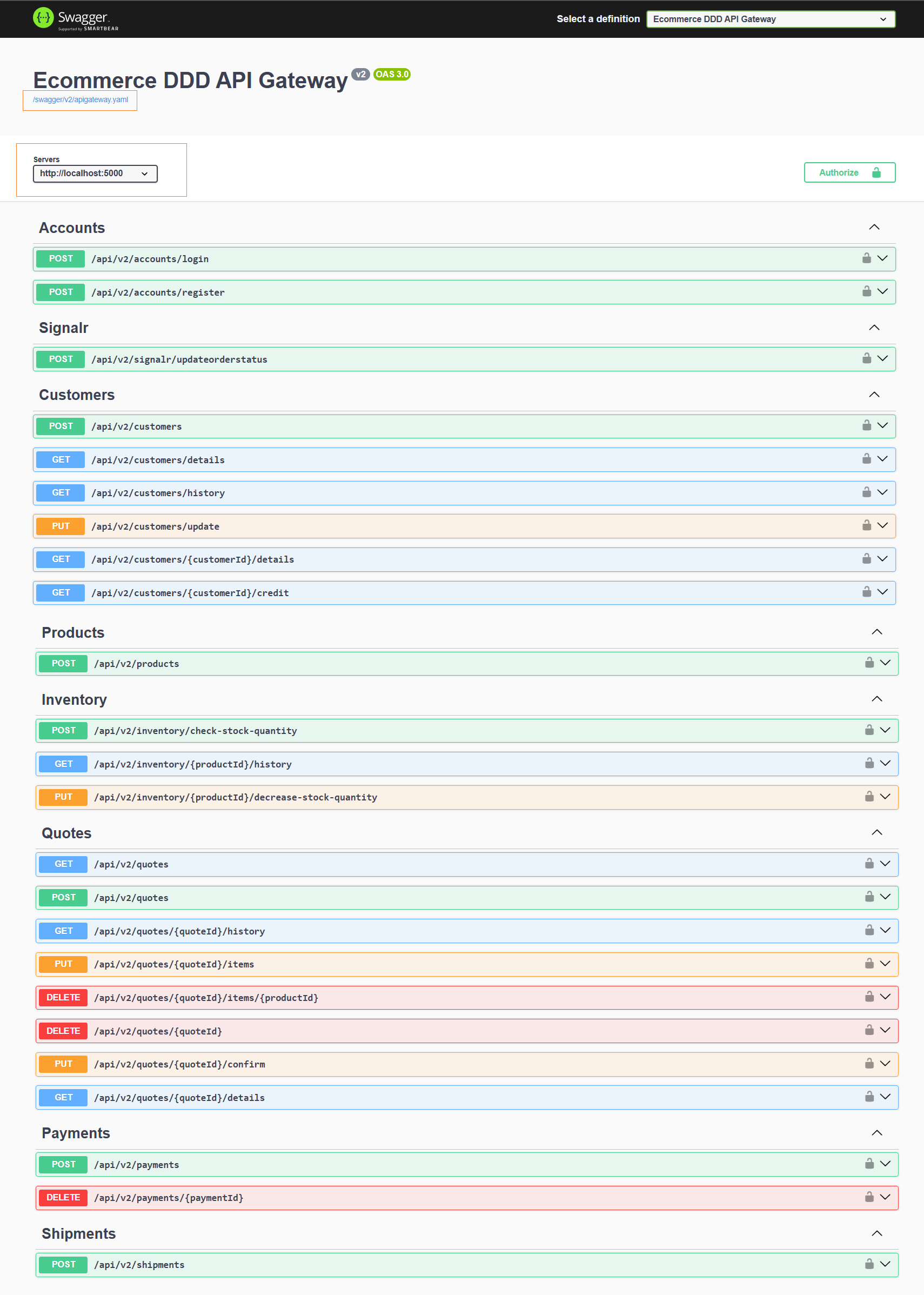
Pretty cool, right? Having all services accessible and documented from a single Swagger UI proved genuinely handy during development. And since the frontend only knows the Gateway server URI, generating Kiota TypeScript clients directly into the SPA was a one-liner command:
Install Kiota as .NET tool
1
dotnet tool install --global Microsoft.OpenApi.Kiota
Generate Kiota client from the API Gateway OpenAPI definition
1
kiota generate --openapi http://localhost:5000/swagger/v2/apigateway.yaml --language TypeScript --output ./src/app/clients
That’s the raw command, useful to understand what happens under the hood. In practice, EcommerceDDD wraps this in regenerate-clients.sh, so a developer working on the project never has to run Kiota manually.
Regenerating Clients in EcommerceDDD
The script reads the specs over the Docker network, so it runs as a tooling container rather than from the host. With the backend stack running, target backend, frontend, or both:
1
2
3
4
5
6
# Regenerate both frontend and backend clients
docker compose --profile tools run regenerate-clients

# Or target one side:
docker compose --profile tools run regenerate-backend-clients    # C#, service-to-service clients
docker compose --profile tools run regenerate-frontend-clients   # TypeScript, single SPA client
| Target | Output |
|---|---|
frontend | TypeScript client → EcommerceDDD.Spa/src/app/clients/ |
backend | C# clients → Crosscutting/EcommerceDDD.ServiceClients/Kiota/<Service>/ |
| (no argument) | Both of the above |
Final Thoughts
In this post, I walked you through a very creative approach to solving one real challenge when it comes to generating API clients to glue backend and frontend together. Contract changes and model drift between the two are error-prone to maintain by hand, and I’m sure there are multiple other techniques and custom implementations out there.
As always, evaluate the trade-offs and keep in mind that API client generation overall introduces another step into your workflow. A stale spec gives a false sense of safety, so it must be taken care of, ideally with some automation to make things as smooth as possible.
Finally, about Koalesce, it’s still evolving and open to contributions. If you run into edge cases or have ideas for improvement, please give me your feedback!