JOSE 101 [1/2]: A Practical Guide to JWT, JWA, JWS and JWE in .NET
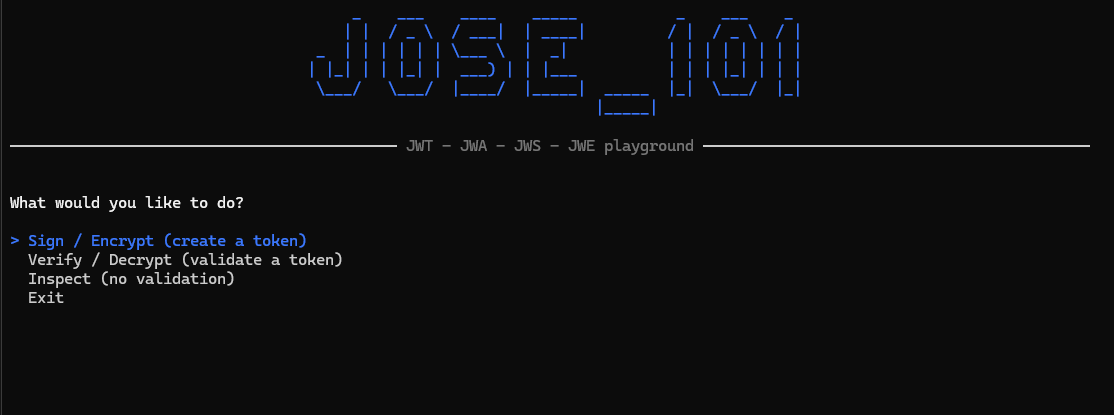
Here we go again, this time on a topic that trips up even seasoned developers, hopefully making it simpler. While most articles I’ve seen on the internet stop at “sign a token with HS256 and move on”, I’m going further in this post with a more comprehensive guide to grasp all the important concepts, alongside the practical JOSE_101 .NET playground app you can use to test everything shown here.
The post covers signing tokens with symmetric and asymmetric keys, encrypting payloads to make them unreadable (not just signed), and combining both by nesting a signed token inside an encrypted one.
As you advance through the topics, complexity grows, and you’ll come away not just knowing what JWS and JWE stand for, but understanding which one to pick, based on your needs and the trade-offs involved.
⚠️ Disclaimer: This series and the app cover a curated set of algorithms picked to teach the concepts (HS256, RS256, ES256 for signing; dir and RSA-OAEP for key management; A256GCM for content), not every JOSE variant available.
If you’re already well versed in the JWS concepts, you can jump straight to JOSE 101 (2/2), where I finish the series with JWE.
The J squad
Before diving into JOSE, it’s worth starting with the format everything here is built on: JSON (JavaScript Object Notation), the default way systems exchange structured data, readable by humans, easy to parse, and supported natively or via libraries in effectively every language. It’s simple by design: just objects, arrays, strings, numbers, booleans, and null.
That simplicity is exactly why JOSE was built around it. When the industry needed a standard way to sign and encrypt small chunks of data, such as tokens, claims and credentials, JSON fit because it carries enough structure to be meaningful, while staying simple enough to serialize compactly and parse anywhere.
Every concept in this post is a JSON object with rules attached, determining what a token contains, which algorithms are allowed to protect it, and how signing or encryption is applied on top.
JOSE (JSON Object Signing and Encryption)
JOSE isn’t an implementation, but a specification, more precisely, a family of RFCs (Request for Comments) that define exactly how those “rules attached to a JSON object” work. It’s not about what your data should be, but how to protect it.
Since it’s platform-agnostic, there are plenty of implementations across multiple stacks and languages. In this post, I’ll stick to jose-jwt, a popular .NET implementation I used in the console app.
JWT (JSON Web Token)
JWT is the format most people refer to as ‘token’, usually in the authentication context, largely used in APIs and distributed systems. It’s a compact, URL-safe way to represent a set of claims, but on its own, it says nothing about data protection, and it’s where the other Js below come in.
Technically, a JOSE token is built from two JSON objects. The header describes how the token is protected, where alg defines the algorithm used, and typ its media type:
1
{ "alg": "HS256", "typ": "JWT" }
And the payload carries the claims, the actual data you want to transport:
Both get base64url-encoded and joined with dots into a long string. How many parts come after those two is what tells whether it’s a JWS or a JWE.
⚠️ Note: the header isn’t something you usually write by hand. The library builds it for you at signing time, filling alg with whichever algorithm you asked for and typ with JWT. All you hand it is the payload.
JWA (JSON Web Algorithms)
JWA is the registry of algorithm identifiers JOSE tokens are allowed to use, and it covers two different jobs.
- For signing, there’s a single choice: the
algheader names the signing algorithm (e.g.,HS256,RS256,ES256, etc). - For encryption, there are two:
algnames the key management algorithm (e.g.,dir,RSA-OAEP, etc), andencnames the content encryption algorithm (e.g.,A256GCM, etc).
⚠️ Note: You can assign the alg as none if you really don’t need to sign the token, but keep in mind it adds a security risk if a system relies on signature verification.
JWK/JWKS (JSON Web Key)
JWK defines how to represent cryptographic keys as JSON objects, for key distribution. A JWKS (JSON Web Key Set) is simply an array of JWKs, typically published at an endpoint so verifiers can fetch the right public key on the fly. It’s covered by its own RFC 7517, but falls outside the scope of this post.
JWS (JSON Web Signature)
JWS is what a signed JWT looks like. The payload stays fully readable, base64url-encoded but not encrypted, and a signature proves it hasn’t been tampered with. It only lets you verify who signed it and that it wasn’t altered, but anyone can read it. In practice, when you use JWTs for production-grade applications, you’re (hopefully) using a JWS, because you must prove authenticity.
JWE (JSON Web Encryption)
JWE is an encrypted JWT. The payload becomes opaque ciphertext, unreadable without the right key. It guarantees that only the intended recipient can read it, since the content is hidden from anyone else. While JWS only proves authenticity, JWE hides content.
JWS - Signing algorithms: HMAC vs RSA vs ECDSA
Symmetric or Asymmetric?
Before signing anything, you need to pick an algorithm, and that choice comes down to one key question: do the signer and the verifier trust each other with the same secret, or not?
That’s the split between symmetric and asymmetric algorithms, and it changes the whole trust model around the key, not just the math behind it.
A symmetric algorithm uses a shared secret for both signing and verifying: whoever holds it can produce a valid signature and check one. That’s simple and fast, but it also means every verifier is a potential signer, which implies both parties holding that secret must trust each other.
An asymmetric algorithm splits that power in two: a private key signs, a public key verifies. In practice, anyone can check a signature’s authenticity without ever being able to forge one, and that’s exactly what you want when tokens travel to services you don’t fully trust with signing power.
The three segments
A JWS has three parts, joined by dots: header.payload.signature.
- The
headerdeclares thealg. - The
payloadcarries the claims. - The
signatureis what proves the other two weren’t touched on the way.
Let’s play with a variety of tokens using the app.
First, clone JOSE_101, run it and choose this menu option: Verify / Decrypt (validate a token).

Then paste the token and the secret key to verify it. You can repeat the same process for all tokens below, while choosing the right menu option for each. 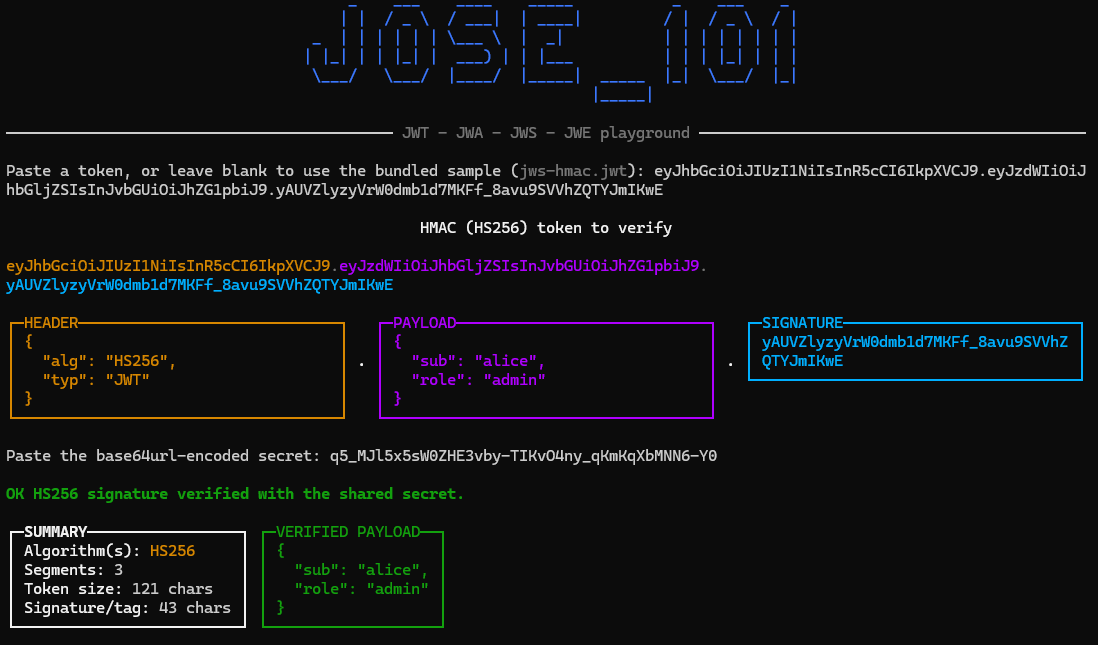
This will allow us to decompose the token into segments, and validate its integrity. That’s the distinction the whole post rests on: signing protects those bytes, it never hides them.
⚠️ Keys are published in the repo so anyone can reproduce the examples. Never reuse them to protect anything real!
HMAC (HS256) - Symmetric
HMAC (Hash-based Message Authentication Code) mixes a secret key with a hash function, a one-way algorithm that turns any input into a fixed-size fingerprint, so the same input always produces the same fingerprint, but you can’t work backwards from the fingerprint to the input. That combination produces a code that proves both integrity (nothing changed) and authenticity (only someone holding the secret could have produced it).
HMAC-SHA256 pairs HMAC with SHA-256 (Secure Hash Algorithm 2), a hash function whose fingerprint is always 256 bits long, no matter the size of the input. Together they give the alg value you’ll see in the token header: HS256.
When to use it: whenever signer and verifier are the same system, or two systems that already trust each other with the same secret. Think a single backend signing its own session tokens, or a CI pipeline signing build artifacts that only its own deploy step needs to verify.
Trade-off: it can’t prove who signed a token to a third party, and that means anyone holding the secret could have produced it. If that secret ever leaks, forged tokens become indistinguishable from real ones.
Token example:
Signature secret key:
Implementation:
RSA (RS256) - Asymmetric
RSA, named after its inventors Rivest, Shamir and Adleman, is an asymmetric algorithm whose security relies on how hard it is to factor the product of two large prime numbers. That combination lets the private key sign while the public key verifies, so proving a signature never requires the power to produce one.
RSASSA-PKCS1-v1_5 pairs RSA with SHA-256 for hashing. Together they give the alg value you’ll see in the token header: RS256.
When to use it: unlike HS256 above, it fits scenarios where the verifier shouldn’t be able to forge tokens. Think a token handed to multiple downstream services, or a public key published as a JWKS endpoint.
Trade-off: it costs more CPU than HMAC and needs key-pair management, rotation, distribution of the public key. That adds complexity and governance, but it’s the price for scaling verification out to parties you don’t fully trust with signing power. It also produces the largest signature of the three (four times ECDSA’s), which rides on every request.
💡 One detail worth knowing before you commit to it: PKCS#1 v1.5 is the older of the two padding schemes RSA signatures can use. It’s still everywhere and still considered safe for signing, but the modern choice is RSA-PSS, which adds randomness to the padding and appears in JOSE as PS256. If you’re picking RSA for a new system and both ends support it, prefer PS256.
Token example:
RSA Public key:
Implementation:
ECDSA (ES256) - Asymmetric
ECDSA (Elliptic Curve Digital Signature Algorithm) is also asymmetric, but its security comes from the math of elliptic curves instead of factoring large numbers, which is what lets it reach the same security level as RSA with much smaller keys and signatures, and cheaper signing.
ECDSA pairs the P-256 curve with SHA-256 for hashing. Together they give the alg value you’ll see in the token header: ES256.
When to use it: it fits the same scenarios as RS256, but pays less for them. Think a high-traffic API where every request carries a token, or mobile and embedded clients where both bandwidth and CPU are scarce.
Trade-off: every signature needs a high-quality random nonce. Reuse one and you leak the private key, a concern RSA doesn’t have. Verification is also slower than RS256.
⚠️ That’s not a theoretical risk: Sony shipped the PlayStation 3 signing with the same nonce every single time, and some smart folks used exactly that to recover the console’s private signing key. In .NET the nonce is generated for you, so it’s not something you handle in application code. Check this awesome blog article for more details.
💡 Although ECDSA yields smaller tokens and cheaper signing at comparable security, most identity providers (Auth0, Okta, Azure AD, Duende IdentityServer) default to RS256, which OpenID Connect requires every provider to support.
Token example:
EC Public key:
Implementation:
Same claims, three signatures
Since the first two segments are the same length across all three (the alg value differs but is always five characters), every size difference you can see comes from the signature alone. The table makes the trade-off easy to spot:
alg | Signature | Token | Key used |
|---|---|---|---|
HS256 | 43 chars | 121 chars | one shared 256-bit secret |
ES256 | 86 chars | 164 chars | EC P-256 key pair |
RS256 | 342 chars | 420 chars | RSA 2048 key pair |
Notice that RS256 produces a signature four times larger than ES256 at a comparable security level, and that cost rides along on every single request carrying the token. And the payload sits there in plain sight in all three, base64url-encoded and easily readable. Signing never hides anything, and that’s precisely the gap JWE exists to fill.
💡 Rule of thumb:
- Use
HMACwhen signer and verifier are the same trusted system. - Use
RSAorECDSAwhen they’re not, preferringECDSAfor smaller tokens, orRSAwhen verification throughput or ecosystem compatibility weighs more.
⚠️ Algorithm pinning: One rule that outranks the algorithm choice
Whichever you pick, the verifier must be told which algorithm to expect, never trusting the token’s own alg field, because the header is potentially attacker-controlled until the signature is checked, and taking it at face value is the root of the two classic JWT attacks:
alg: none, where an unsigned token gets accepted anyway.RS256toHS256confusion, where an attacker re-signs a token using your public key as if it were an HMAC secret.
So declare the expected algorithm at the verification call, and a token that arrives with any other one gets rejected before any key is touched.
💡 Tip: With jose-jwt, use the Verify() method instead of Decode(). Verify will ensure the right algorithm was set, and throw an InvalidAlgorithmException if it can’t assert the signing algorithm type.
1
JWT.Verify(token, publicKey, JwsAlgorithm.RS256);
What’s next
In the next post, I’ll cover JWE, where encrypting takes two headers instead of one. I’ll finish the series with Nested JOSE, signing a token and then encrypting it.
Links worth checking
- RFC 7515 - JSON Web Signature (JWS)
- RFC 7516 - JSON Web Encryption (JWE)
- RFC 7517 - JSON Web Key (JWK)
- RFC 7518 - JSON Web Algorithms (JWA)
- RFC 7519 - JSON Web Token (JWT)
- jwt.io - decode and inspect tokens in the browser
- JWKS - publishing public keys for verification
- jose-jwt
- Decoding the PlayStation 3 Hack: Unraveling the ECDSA Random Generator Flaw